Pon Map
A simple mind map for branching your thoughts out and sorting them quickly. It works with one simple action — just press the add-child button — and the layout arranges itself.
The interface is in Japanese.
Work last updated:
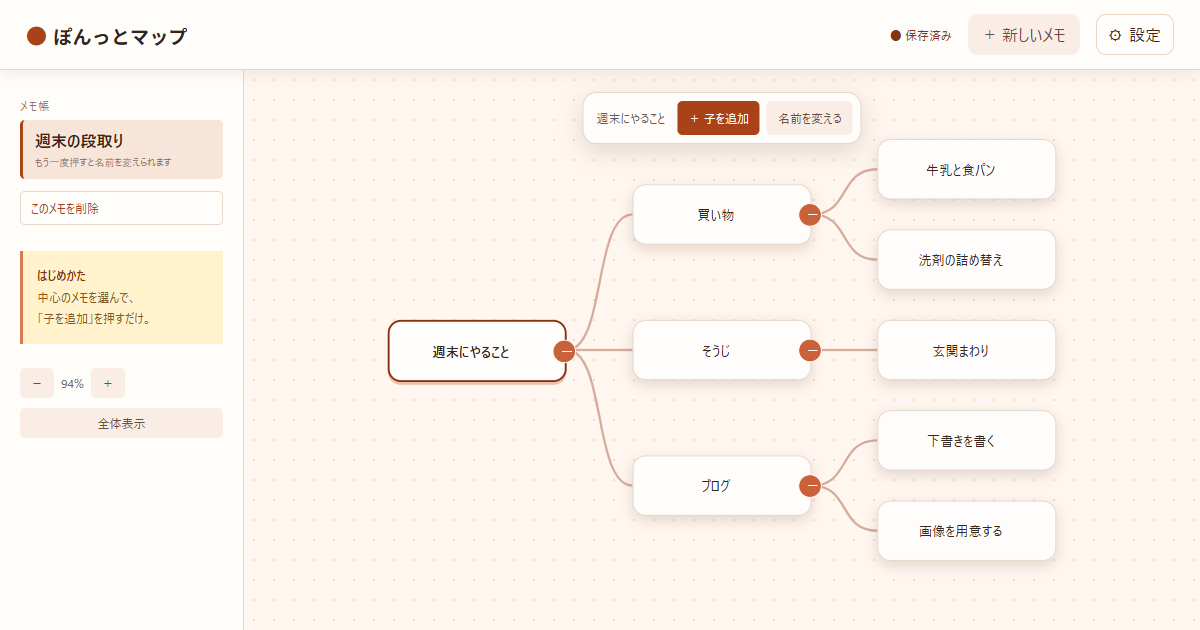
The interface is in Japanese.
When this is useful
This is a tool for when you want to get what is in your head written down first, without worrying about the order. It suits coming up with ideas, sorting out your thinking, and listing out what needs doing. I made it for people who want to lay related things out as branches and look at them before pulling it all together into prose.
Requirements
- It is free to use at present. No account registration is needed either.
- It is a tool you open and use in a web browser. It works on a phone as well, but because of the room the controls need, a computer is recommended.
How to use it
- Press "Open the tool" and it opens with a single node placed in the center
- Select the note in the center (a node) and press the add-child button (+子を追加), and a branch grows from it
- After that you just keep growing branches as you sort out your thinking. It also works for listing out what needs doing
What it can do
| Feature | Details |
|---|---|
| Editing nodes | Add, rename (a double-click or F2 also starts editing), and delete a whole branch (with a confirmation dialog) |
| Folding | Fold and unfold each branch, so only the part you want to look at is shown |
| Switching notebooks | Switch between several "notebooks" in the left sidebar, and rename or delete them |
| Note field | A note panel that opens and closes, where you can write text for each notebook (the 📝 note button opens and closes it) |
| Splitting off a branch | You can copy a branch you have selected and make it a new notebook of its own (the original notebook is left as it is) |
| View controls | Zoom (12%–180%), a fit-to-screen button, and panning by dragging |
| Themes | Choose from four themes: warm, day, night and sky |
| Automatic saving | Saved automatically to browser storage. The save state is shown in the header |
| Backups | You can export and import a JSON file |
How your data is handled
The maps and notes you create are saved automatically to browser storage. There is no mechanism that sends what you type to a server for this tool. What is browser storage?
- Where it is stored: It is saved only inside this browser.
- Deleting: You can delete maps you no longer need from inside the tool. If you delete the browser's site data, every map you have saved is deleted too.
- Backups: You can export a JSON file for restoring later and load it back in. For sharing, you can also export a PNG image or Markdown.
- Access analytics: This introduction page uses access analytics to see how the site is being viewed. It does not collect what you type into your maps. Please see the privacy policy for details.
Honest caveats
If you clear your browser's data, the maps you saved are deleted too. For anything that matters, please export a JSON backup first.
- Because the data is saved only inside the browser, your notes are not carried over automatically when you open the tool on another device or in another browser
- For notes that matter, exporting a JSON backup and keeping it at hand is recommended
- It works on a phone, but because of the room the controls need, growing branches and sorting things out is easier on a computer
- Even after the regular release, the specification may change as the tool is made easier to use and features are added
Update history
- Exporting as a PNG image or Markdown became possible.
- Scrolling and the on-screen control buttons were made easier to use.
- Added a note field for each map, and a feature to duplicate a branch as a new map.
- Improved stability.
- Released on urara.dev.
Behind the making
The feature for splitting a branch off as a new map, the note field, and how it is actually used are covered in the making-of post (in Japanese).

Who made this
麗 (urara) makes this as a personally developed tool, working things out in conversation with AI. I build things I want to use myself, and things that are a little fun, at a small size that I grow over time.